


Server identity and monitoring history
pganalyze recognizes a server by an identity that the collector derives from your configuration and reports with every snapshot. As long as that identity stays the same, all statistics keep accumulating on the same server, and the server keeps its history, name, tags, check configuration, and alert settings.
Part of the identity changes when you replace an instance, move a database to a different hosting
provider, or move it to a different AWS account. The collector then reports an identity that
pganalyze has not seen before. By default this creates a new server, leaving the original one
behind with all of the previous history. To avoid that, you can tell the collector what the
previous identity was, using the api_system_id_fallback, api_system_type_fallback, and
api_system_scope_fallback settings. pganalyze then finds the existing server and updates it to
the new identity, so the history carries over.
How pganalyze identifies a server
A server’s identity consists of three parts:
- System type (
api_system_type): the kind of system, e.g.amazon_rdsorself_hosted - System ID (
api_system_id): identifies the instance within that system type - System scope (
api_system_scope): additional identifying characteristics, used when the system ID alone is not unique across your infrastructure (for example, an RDS instance ID is only unique within an AWS account and region)
The collector detects all three automatically, based on how you configured it:
| System type | System ID | System scope |
|---|---|---|
amazon_rds | Instance ID, or cluster ID for Aurora | region/account_identifier, see below |
azure_database | Server name | (empty) |
google_cloudsql | Instance ID, or cluster:instance for AlloyDB | GCP project ID |
aiven | Service ID | Aiven project ID |
crunchy_bridge | Cluster ID | (empty) |
tembo | Namespace | (empty) |
planetscale | org/database/branch | (empty) |
neon | Database hostname | (empty) |
supabase | Project ref | (empty) |
heroku | Name of the config var, without the _URL suffix (e.g. DATABASE) | (empty) |
self_hosted | Database hostname, or the collector host’s hostname for local connections | port/dbname |
For Amazon RDS, the account identifier in the scope comes from the aws_account_id setting. Unless
you set that explicitly, the collector reads it from the second label of the RDS hostname, which is
the account-specific identifier AWS assigns, and usually not your numeric AWS account ID. For
example,
production.abcd1234efgh.us-east-1.rds.amazonaws.com produces the scope us-east-1/abcd1234efgh.
For an Aurora cluster endpoint the identifier keeps its cluster- prefix (cluster-ro- for a
reader endpoint), giving a scope like us-east-1/cluster-abcd1234efgh. If no account identifier is
available at all, the scope is just the region.
You can override any of them explicitly, but we recommend leaving the automatic detection in place unless you have a specific reason not to.
Finding the current values
Open the Settings page for the server in pganalyze and look at the Debug Info panel. The System Type, System ID, and System Scope fields show the identity that pganalyze currently has stored.

Note that the panel shows a display name for the system type (“Amazon RDS”), whereas the setting
takes the value from the table above (amazon_rds). An empty System Scope is expected for the
system types that the table shows without one.
When you need to set a fallback
Set the fallback for each part of the identity that is changing, before the collector starts reporting the new identity:
| What is changing | Fallbacks to set |
|---|---|
| The instance is replaced within the same provider, and the instance ID changes | api_system_id_fallback |
| The database moves to a different provider | api_system_id_fallback and api_system_type_fallback, plus api_system_scope_fallback if the previous provider stored a scope |
| The database moves to a different AWS account, GCP project, or Aiven project | api_system_scope_fallback |
| The port or database name of a self-hosted server changes | api_system_scope_fallback |
Each fallback only widens the lookup for the part of the identity you give it. If two parts change and you only set one fallback, pganalyze will not find the existing server, so make sure to cover every part that is changing.
Setting the fallbacks
The fallbacks are regular collector settings, so they go in the server’s section of the INI
config, or are set as environment variables for environment-only setups such as Docker:
| Setting | Environment variable |
|---|---|
api_system_id_fallback | PGA_API_SYSTEM_ID_FALLBACK |
api_system_type_fallback | PGA_API_SYSTEM_TYPE_FALLBACK |
api_system_scope_fallback | PGA_API_SYSTEM_SCOPE_FALLBACK |
Example: moving from Heroku Postgres to Amazon RDS
The previous identity was the heroku system type with the DATABASE system ID (from the
DATABASE_URL config var) and no scope. Since Heroku stores no scope, only the ID and type
fallbacks are needed:
[rds_production]
db_host = production.abcd1234efgh.us-east-1.rds.amazonaws.com
db_name = production
api_system_id_fallback = DATABASE
api_system_type_fallback = heroku
Example: moving a self-hosted server to Amazon RDS
The previous identity was the self_hosted system type, with the database hostname as the system
ID and port/dbname as the scope. Unlike Heroku in the example above, self-hosted servers do store
a scope, so all three fallbacks are needed:
[rds_production]
db_host = production.abcd1234efgh.us-east-1.rds.amazonaws.com
db_name = production
api_system_id_fallback = db1.internal.example.com
api_system_type_fallback = self_hosted
api_system_scope_fallback = 5432/production
If the collector previously connected to Postgres on localhost, the system ID was the hostname of
the machine the collector ran on, rather than a database hostname. Check the Debug Info panel
to see which value pganalyze has stored.
Example: replacing an RDS instance
Only the instance ID changes, so only the ID fallback is needed:
[rds_production]
db_host = production-v2.abcd1234efgh.us-east-1.rds.amazonaws.com
db_name = production
api_system_id_fallback = production
Example: moving an RDS instance to a different AWS account
The system ID and type stay the same, and only the scope changes, since the RDS scope contains the account identifier from the hostname:
[rds_production]
db_host = production.wxyz5678mnop.us-east-1.rds.amazonaws.com
db_name = production
api_system_scope_fallback = us-east-1/abcd1234efgh
Carrying the server over
The fallbacks take effect on the first snapshot the new collector sends, including the one sent by
pganalyze-collector --test. That snapshot re-keys the existing server to the new identity for
good, so the test run performs the carry-over rather than previewing it.
Because of that, stop the collector for the old instance first. If it keeps running afterwards, its snapshots no longer match the server, which now carries the new identity, and pganalyze creates a second server for the old instance.
- Stop the collector that monitors the old instance, or remove its section from the collector configuration and reload.
- Open the existing server in pganalyze and note the URL of its page, for example
https://app.pganalyze.com/servers/exampleserverexampleserver. This is the server whose history you are carrying over. - Add the fallback settings to the collector configuration for the new instance, and point the collector at it.
- Run
pganalyze-collector --testto submit the first snapshot under the new identity.
The test summary reports the identity the collector detected for each configured server, and links to the server that the snapshot was associated with:
Server rds_production:

    ✓ System Type:          amazon_rds
    ✓ System Scope:         us-east-1/abcd1234efgh
    ✓ System ID:            production
    ✓ pganalyze connection: ok
    ...
      View in pganalyze:    https://app.pganalyze.com/servers/exampleserverexampleserver

    ✓ All features ok
If the View in pganalyze link points at the existing server, the fallback matched, and that server kept its history under its new identity. If it points at a server you have not seen before, a new server was created and the fallback did not match.
Once the link points at the right server, remove the fallback settings again. They are only needed
for the snapshot that carries the server over, and leaving them in place makes the configuration
harder to reason about later. For package-based installs, a successful --test also reloads the
collector, so no separate reload is needed.
If a new server was created instead, compare the system type, scope, and ID from the test summary against the previous identity shown in the Debug Info panel of the original server, and see the limitations below.
Limitations
- The fallbacks must be in place before the collector first reports the new identity. pganalyze always looks for the new identity first, so once a second server exists, that one matches and the fallbacks never take effect.
- The two instances cannot be monitored at the same time. Carrying a server over is a cutover: a server holds one identity, so once it is re-keyed to the new instance, snapshots from the old instance no longer match it and create a second server. If you need to monitor both instances in parallel during a migration, they are two servers in pganalyze, and their history cannot be merged afterwards.
- Only servers in the same organization are matched. Carrying a server over to a different organization is not supported.
- Explicit fallbacks replace the automatic ones. The collector sets some fallbacks by itself:
for Aiven, Neon, and Supabase it fills in all three, so servers that older collector versions
detected as
self_hostedare still recognized, and for Amazon RDS it sets the scope fallback to the bare region, which is the scope format from before the account identifier was included. Setting a fallback by hand replaces the automatic value, so on those platforms make sure the value you set describes the identity that pganalyze has stored. - Version requirements. Setting the fallbacks through environment variables requires collector
0.74.0 or newer; earlier versions support the
INIconfig settings only. On pganalyze Enterprise Server, releases 2026.08.0 and older only supportapi_system_scope_fallback, so carrying a server over with a changed system ID or type requires a newer release.
Monitoring Amazon Aurora clusters through a failover
When an Aurora cluster fails over, a reader instance is promoted and becomes the new writer. How that shows up in pganalyze depends on what you want a pganalyze server to represent: a specific instance, or a role in the cluster (the writer, or the reader). The collector supports both, and you choose between them by the endpoints you configure.
One server per instance
Configure each instance by its instance endpoint:
[instance-1]
db_host = instance-1.abcd1234efgh.us-east-1.rds.amazonaws.com
...

[instance-2]
db_host = instance-2.abcd1234efgh.us-east-1.rds.amazonaws.com
...
Each pganalyze server then always describes the same instance, and its role changes when the
cluster fails over. After a failover, the server for instance-1 becomes a replica, and the server
for instance-2 becomes the primary.
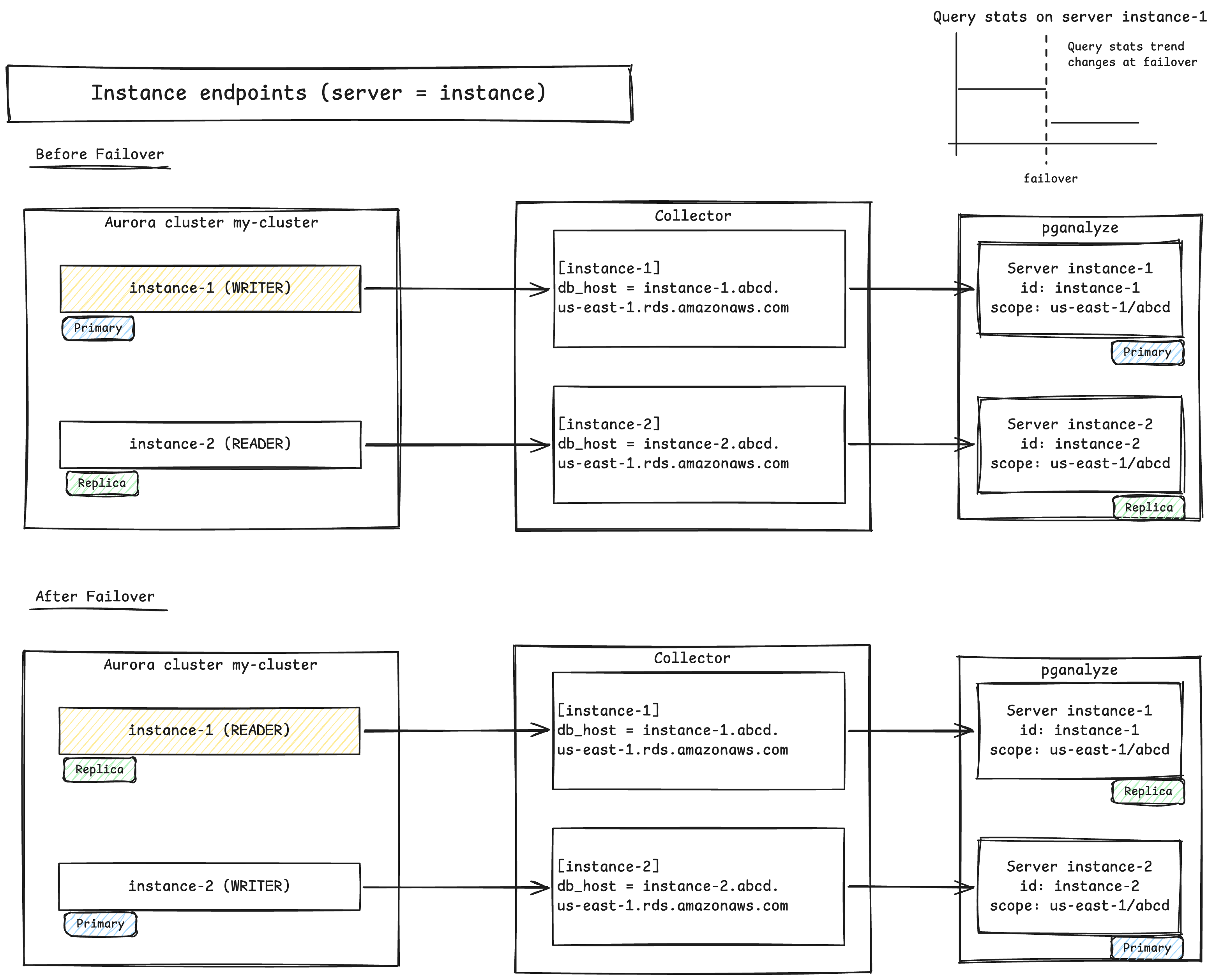
This works with any number of reader instances. The trade-off is that the history of your primary
workload is split across servers: query statistics for the primary are on the instance-1 server
up to the failover, and on the instance-2 server after it.
One server per role
Configure the cluster endpoint for the writer, and the reader endpoint for the reader:
[writer]
db_host = my-cluster.cluster-abcd1234efgh.us-east-1.rds.amazonaws.com
...

[reader]
db_host = my-cluster.cluster-ro-abcd1234efgh.us-east-1.rds.amazonaws.com
...
Each pganalyze server then always describes the same role, and the instance behind it changes when
the cluster fails over. The Postgres connection follows the role through the endpoint, and the
collector looks up the instance that currently has the role to fetch logs and system metrics from
AWS. The writer server keeps showing the primary workload with continuous history, no matter
which instance is the writer.
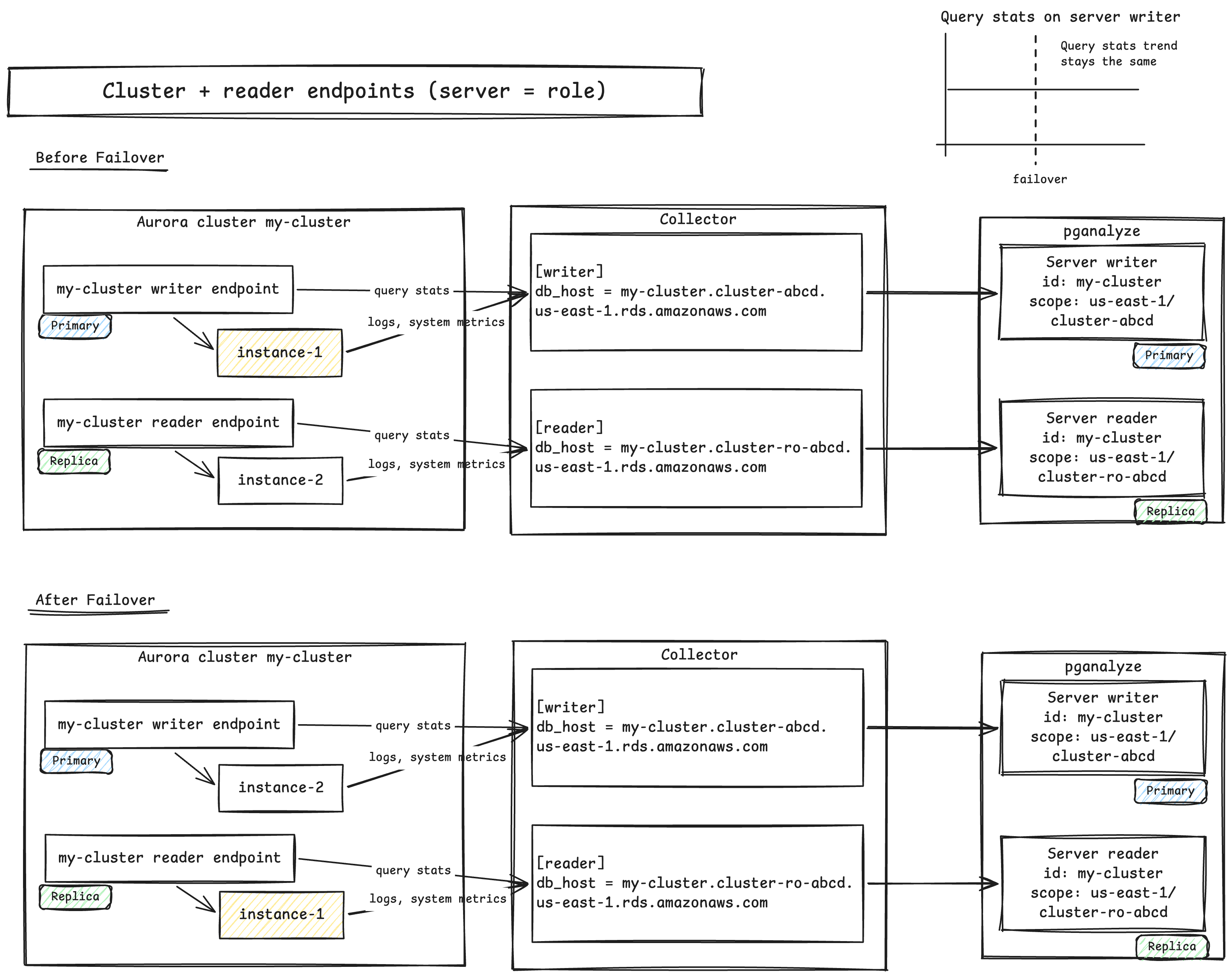
Both servers share the cluster ID as their system ID, and are told apart by the system scope:
us-east-1/cluster-abcd1234efgh for the writer, and us-east-1/cluster-ro-abcd1234efgh for the
reader.
This setup requires a cluster with exactly one reader instance (or only the writer section
if there is none). With multiple readers, the reader endpoint balances connections across them, and
the collector cannot tell which instance to monitor. In that case it reports an error for logs and
system metrics, and asks you to use instance endpoints instead.
The same applies if a reader is added to the cluster later, for example by Aurora Auto Scaling.
The writer server keeps working, but the reader server starts reporting this error, and its
query statistics mix data from the readers. To fix this, replace the reader section with one
section per reader instance endpoint.
Choosing between them
If your cluster has more than one reader instance, or might have in the future, use one server per instance.
Otherwise, either option works, and the choice comes down to what you want to follow over time. One server per role gives the primary workload a single, continuous history and a stable URL in pganalyze, regardless of which instance is the writer. One server per instance keeps each instance’s history together, and keeps working unchanged as you add more readers.
Whichever you choose, use it for all of the servers in the cluster. In particular, if you connect
through the cluster or reader endpoint, do not also set aws_db_instance_id. That setting pins the
logs and system metrics to one instance, while the Postgres connection follows the role. After a
failover, the server then shows query statistics from one instance next to logs and system metrics
from another, without any error to point this out.
Switching between the two
Switching from one option to the other changes the identity of every server in the cluster, so by default it creates new servers. To carry an existing server over, set the fallbacks to its previous identity. Each previous server can only be carried over to one new server, and the history of two servers cannot be merged, so decide which history each new server should continue.
For example, when switching from one server per instance to one server per role, the writer
server can continue the history of the instance-1 server, which is the current writer:
[writer]
db_host = my-cluster.cluster-abcd1234efgh.us-east-1.rds.amazonaws.com
...
api_system_id_fallback = instance-1
api_system_scope_fallback = us-east-1/abcd1234efgh
The reader server can likewise continue the history of the instance-2 server.
Follow the steps in Carrying the server over, and check the Debug Info panel of each existing server for the identity that pganalyze has stored.
Couldn't find what you were looking for or want to talk about something specific?
Start a conversation with us →